Visitor management, defined
A visitor management systemis software that digitises the reception desk. Every time a guest, contractor, candidate, courier, or vendor arrives, the system captures who they are and why they're there, notifies the person hosting them, issues a visitor badge, and keeps a timestamped record — then closes the loop when they leave. It replaces the paper logbook (unreadable and impossible to search) and the manual sign-in sheet with a professional, contactless experience.
Modern systems are QR-first and contactless: the visitor scans a QR code at reception and checks in from their own phone's browser — no app to download and, ideally, no kiosk tablet to buy and maintain. This approach is often called QR code visitor management or visitor self check-in, because the guest signs themselves in. myvisitors.app is one example of a QR-first, self-hosted visitor management system.
How does a visitor management system work?
A complete VMS handles the whole visit in a few quick steps:
- 1Scan the QR. The visitor scans a QR code at reception (or opens a pre-registration link) — no app required.
- 2Check in. They enter their name, company, purpose of visit, and who they're seeing, and take a quick selfie.
- 3Host approval. The host is notified instantly and approves or declines in one tap, from email or a dashboard.
- 4Digital badge. The approved visitor gets a live digital badge with a scannable QR that security can verify.
- 5Check-out. On the way out the visitor checks themselves out — or the front desk does, or the system does it automatically.
- 6Records & reports. Every visit becomes a searchable, timestamped record, and the building's on-site occupancy stays accurate in real time.
See this flow in detail on the how it works page.
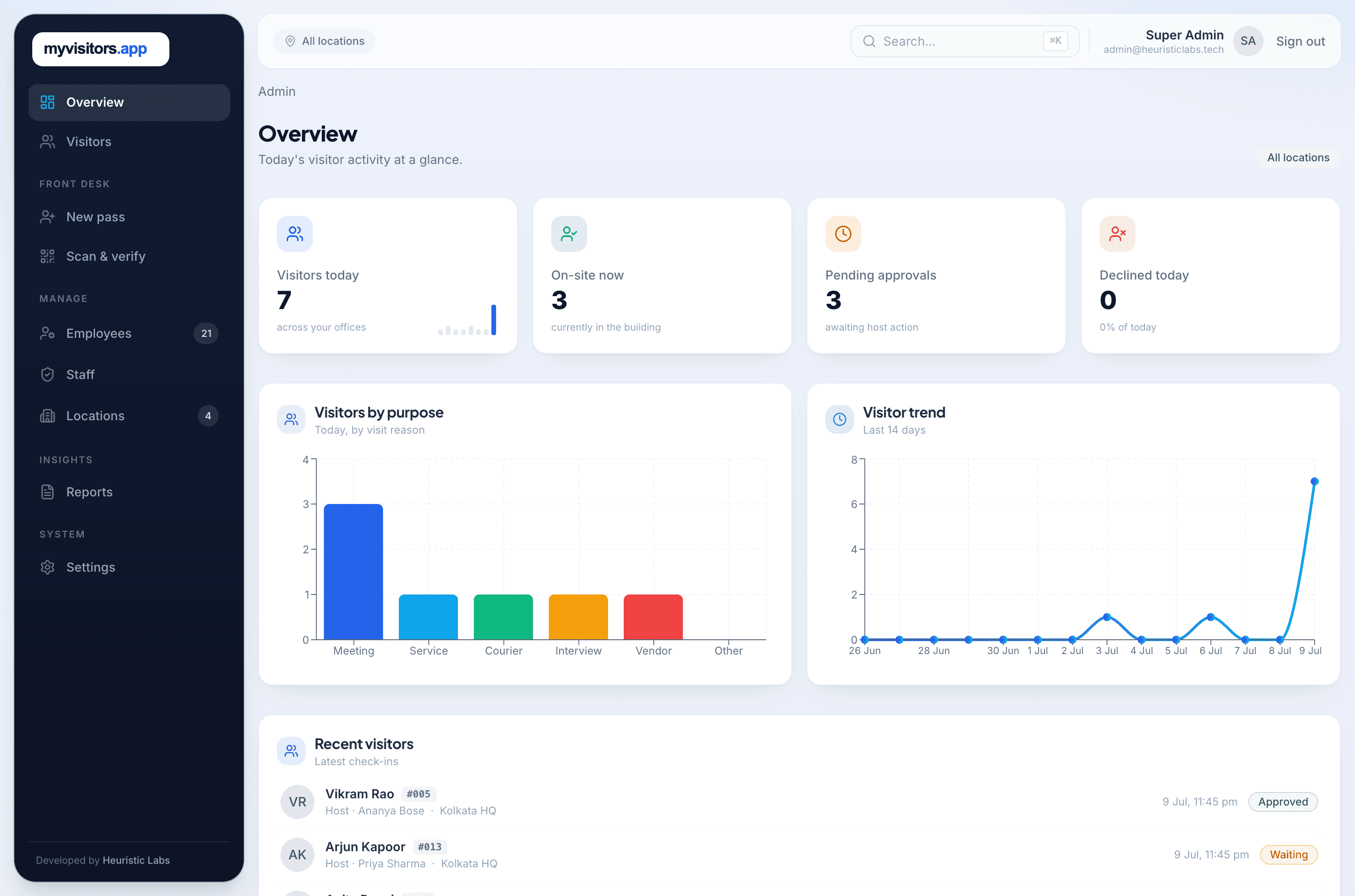
Key features of a visitor management system
Not every system does everything. These are the features that separate a real VMS from a basic sign-in pad:
- Contactless QR check-in from the visitor's own phone (no app)
- Live selfie / photo capture and purpose-of-visit fields
- Real-time host notification and one-tap approve / decline
- Pre-registration of expected guests for instant entry
- Live digital badge with a scannable verification QR (and printed badges where needed)
- Check-out — visitor, front-desk, and automatic — with accurate on-site occupancy
- Multi-location support with role-based access for staff
- Employee / host directory sync (Google Workspace, Microsoft 365)
- Searchable records, reports, and CSV export for audits
- Custom branding and security controls (encryption, retention)
Explore each in depth on the features page.
Benefits: why replace the paper logbook?
A handwritten register is slow, illegible, easy to fake, and impossible to search when you need it. A visitor management system fixes all of that and adds real security value:
- Security — you know exactly who is on-site at any moment, not just who signed in.
- Speed — check-in drops from a two-minute scrawl to seconds, and the lobby stays calm.
- Compliance & audit — every visit is timestamped, searchable, and exportable for reconciliation.
- Safety — accurate live occupancy supports evacuation and duty-of-care obligations.
- Professional impression — a branded digital badge beats a clipboard.
- Privacy — visitors don't see the previous guest's details the way they would on a shared paper page.
How a paper-based or manual visitor log fails your organisation every day
The visitor book on the reception desk feels harmless. In practice, a paper or manual sign-in log quietly costs you security, time, and compliance on every single shift:
It can't tell you who's on-site
A logbook records arrivals, not departures. In a fire or evacuation you have no reliable roll-call of who is still in the building — a genuine life-safety gap.
It leaks visitor data all day
Every guest sees the previous visitor's name, company, and phone number written on the page above. That's a privacy breach repeated with each sign-in.
It's unreadable and unsearchable
Half-finished, illegible entries are useless when you need them. "Who visited on the 3rd?" means flipping pages by hand — if the book hasn't been lost or coffee-stained.
Anyone can fake it
No photo, no verification, no host approval. A visitor can write any name and walk in; security has nothing to check against.
Hosts don't know their guest arrived
Reception phones around to find the host while the visitor waits in the lobby. Multiply that by every visit, every day.
It fails audits and retention rules
There's no timestamped, exportable trail, no access control over who reads it, and no way to enforce a retention policy — a problem under DPDP and GDPR.
A modern system fixes each of these: real check-out and live occupancy, private per-visitor check-in, searchable timestamped records, photo capture and host approval, instant notifications, and controlled retention.
Cloud vs self-hosted (on-premise) visitor management
Visitor management systems come in two deployment models, and the difference matters for data control and cost:
Cloud (SaaS)
The vendor hosts everything; you pay a subscription, usually per location and often per user. Fastest to start, but your visitor data lives on the vendor's servers.
Dedicated / self-hosted (single-tenant)
A dedicated, single-tenant deployment runs on your own infrastructure — or on a dedicated instance the vendor runs just for you — instead of a shared, multi-tenant cloud. Your data is isolated, and pricing can be a flat licence rather than per-user. This is how myvisitors.app works: self-host it, or let us run a dedicated instance for you.
Who needs a visitor management system?
Any organisation with a front door and a duty of care benefits from one. The most common are:
Offices & corporate HQs
Guests, candidates, couriers
Coworking spaces
Members and day guests
Factories & warehouses
Contractors and vendors, safety sign-off
Clinics & healthcare
Patients and visitors, privacy rules
Schools & campuses
Parents, suppliers, safeguarding
Multi-location companies
Every branch on one dashboard
How to choose a visitor management system
Use this checklist when you compare options. If a vendor can't answer “yes” to the ones that matter to you, keep looking:
- Do visitors check in with no app to install?
- Is any reception hardware (kiosk, scanner) actually required?
- Does it do true check-out and live occupancy — not just sign-in?
- Can it run multiple locations with role-based access?
- Does it sync your employee directory (Google Workspace / Microsoft 365)?
- Who owns the visitor data — can you self-host it?
- Is pricing per-user, per-location, or a flat fee?
- Does it support your compliance needs (GDPR / DPDP, retention)?
How much does a visitor management system cost?
Pricing ranges from free tiers to $500+ per location per month, with most mid-market plans landing around $100–$300 per location — and many vendors add per-user fees on top. That means your bill grows as you add offices, staff, or visitors. Note that a permanently free QR code visitor management plan usually comes with tight caps; most teams start with a free trial and then move to a paid plan.
An alternative is a flat annual licence: one predictable fee with no per-user, per-seat, or per-visitor charge. Because myvisitors.app is a dedicated deployment on your own infrastructure (or one we host for you), there's no cap on branches, visitors, or staff — see how pricing works.
Visitor management system FAQ
Is a visitor management system the same as a sign-in app?
Broadly, yes — a sign-in app is a visitor management system. The term "visitor management system" usually implies the fuller workflow: check-in, host approval, digital badges, check-out, occupancy, and reporting, not just capturing a name.
Do visitors need to install an app to check in?
Not with a modern, QR-first system. The visitor scans a QR code and checks in from their phone's browser. Older systems rely on a shared kiosk tablet instead.
Should I choose a cloud, self-hosted, or dedicated visitor management system?
Shared cloud SaaS is fastest to start but puts your data on a multi-tenant platform. A dedicated deployment — self-hosted on your own infrastructure, or a single-tenant instance the vendor runs for you — isolates your data and often changes the pricing model. If data residency or isolation matters, choose dedicated / self-hosted.
How much does a visitor management system cost?
Most are priced per location per month, commonly $100–$300, and often add per-user fees. A few, like myvisitors.app, use one flat annual licence with no per-user cost because they run on your own infrastructure.
How does a visitor management system handle GDPR and DPDP?
A VMS collects personal data (name, photo, purpose), so how it stores, scopes, and retains that data matters. Look for role-based access, configurable retention, automatic photo cleanup, and — for the strongest control and data residency — self-hosting, which keeps the data on infrastructure you own.
See it in action
Book a 20-minute demo and we'll show myvisitors.app set up for your own offices — QR check-in, host approval, badges, and live occupancy.